From Color‑blind friendly
to Vision‑independent guidance
From Color‑blind friendly
to Vision‑independent guidance
Overview
Visual impairment is not a single condition
—it exists on a spectrum
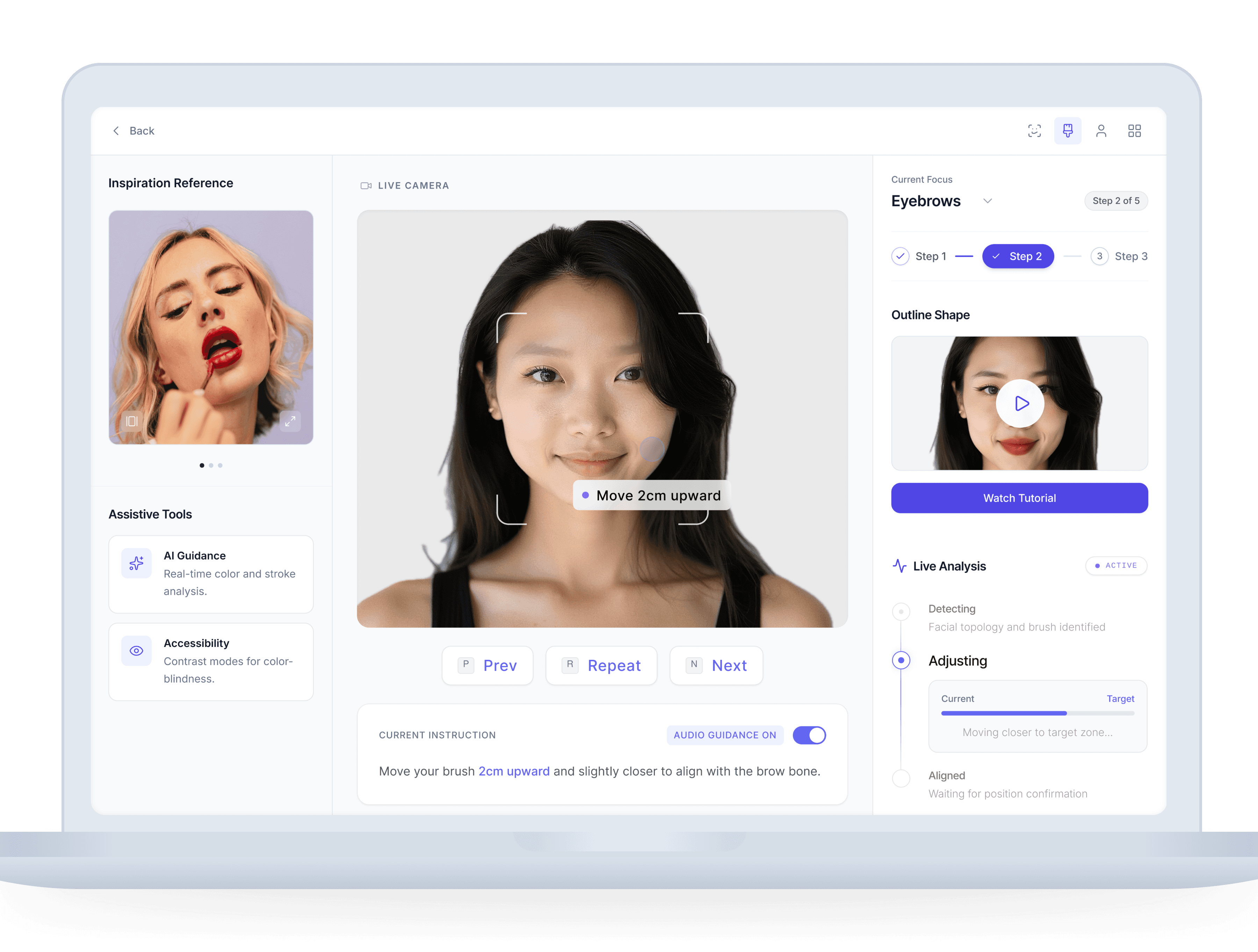
Lumina is an AI-powered makeup tutorial developed for Microsoft’s Imagine Cup. The first version focused on helping users with color blindness apply makeup without relying on color cues.
After 50+ user interviews, we realized the problem was larger: visual impairment exists on a spectrum.
In our second iteration, we expanded Lumina toward a vision-independent experience — re-architecting the tutorial flow with WCAG principles so users can complete each step through structured feedback, keyboard navigation, and screen reader support.
Lumina is an AI-powered makeup tutorial developed for Microsoft’s Imagine Cup. The first version focused on helping users with color blindness apply makeup without relying on color cues.
After 50+ user interviews, we realized the problem was larger: visual impairment exists on a spectrum.
In our second iteration, we expanded Lumina toward a vision-independent experience
— re-architecting the tutorial flow with WCAG principles so users can complete each step through structured feedback, keyboard navigation, and screen reader support.
Role
Product Designer
Product Designer
CONTEXT
Microsoft Imagine Cup
Microsoft Imagine Cup
Users
Low-vision to Blind
Low-vision to Blind
Focus
Vision-independent interaction
Vision-independent
interaction
The Problem
The Problem
The product's limitations weren't just missing contrast ratios. The fundamental interaction model excluded users entirely.
The product's limitations weren't just missing contrast ratios.
The fundamental interaction model excluded users entirely.
Level 1: Compliance
Structural gaps.
Structural gaps.
Contrast & Layout: Low contrast typography and
completely indistinguishable interface boundaries.
Contrast & Layout: Low contrast typography and completely indistinguishable interface boundaries.
Semantics: Unlabeled icon-only controls disrupting
predictable screen reader traversal.
Semantics: Unlabeled icon-only controls disrupting predictable screen reader traversal.
State Architecture: Unannounced live updates causing continuous interaction context loss.
State Architecture: Unannounced live updates causing continuous interaction context loss.
Level 2: Experience
Interaction exclusion.
Interaction exclusion.
Feedback Loops: Absolute reliance on the camera preview as the sole interaction feedback mechanism.
Feedback Loops: Absolute reliance on the camera preview as the sole interaction feedback mechanism.
Confirmation: Zero semantic or auditory alternatives provided for AI detection confirmations.
Confirmation: Zero semantic or auditory alternatives provided for AI detection confirmations.
Spatial Awareness: Assumed visual depth perception, effectively blocking completely blind users.
Spatial Awareness: Assumed visual depth perception, effectively blocking completely blind users.
Intervention
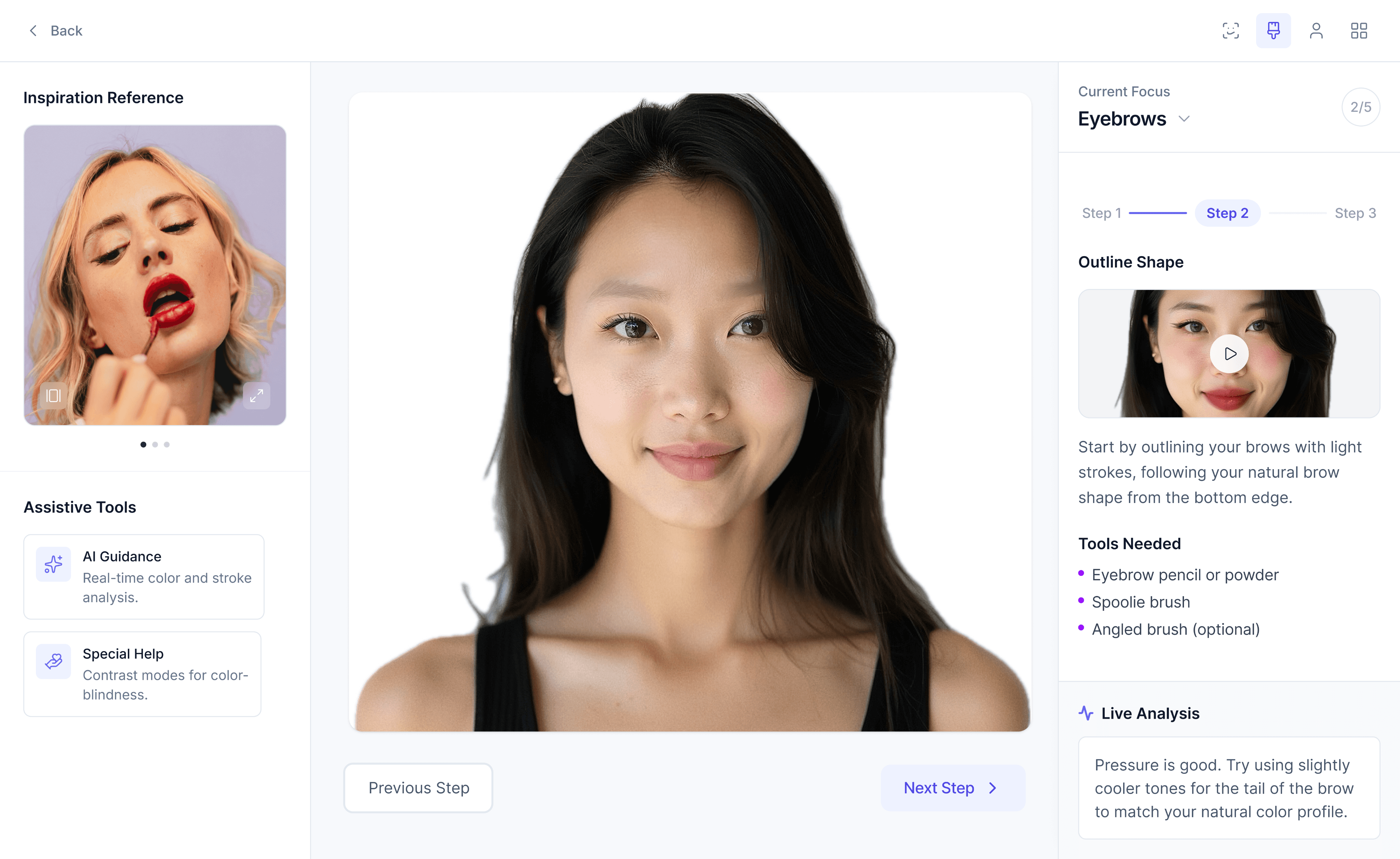
Visual & Structural Refinements.
Resolving contrast, target sizes, and state indication for an accessible foundation.
Visual-First
Low Compliance
Current Focus
Eyebrows
2/5
Step 1
Step 2
Step 3
Outline Shape

Start by outlining your brows with light
strokes, following your natural brow
shape from the bottom edge.
Tools Needed
Eyebrow pencil or powder
Spoolie brush
Angled brush (optional)
Live Analysis
Pressure is good. Try using slightly
cooler tones for the tail of the brow to match your natural color profile.
Inclusive-First
AA / AAA Compliant
Current Focus
Eyebrows
Step 2 of 5
Step 1
Step 2
3
Step 3
Outline Shape

Start by outlining your brows with light
strokes, following your natural brow shape
from the bottom edge.
Watch Tutorial
Tools Needed
Eyebrow pencil or powder
Spoolie brush
Angled brush (optional)
Live Analysis
Pressure is good. Try using slightly
cooler tones for the tail of the brow to match your natural color profile.
WCAG 1.4.3: Low Text Contrast
Text relies heavily on light grays (approx. 2.8:1) against white backgrounds, failing the 4.5:1 minimum requirement.
WCAG 1.4.11: Non-Text Contrast
Controls, borders, and progress indicators lack sufficient contrast, failing the 3:1 minimum requirement for non-text elements.
Missing Semantics & Targets
Interactive elements do not meet the 24×24 minimum hit area (WCAG 2.2). No visible focus styles are defined for keyboard users.
Dynamic feedback areas lack explicit status communication for assistive technologies.
WCAG 1.4.3 & 1.4.11: Contrast
PASS
All text elements were updated to meet the 4.5:1 minimum contrast ratio. Non-text elements—including controls, boundaries, and progress indicators—were adjusted to exceed the required 3:1 threshold.
WCAG 2.5.8: Target Size
PASS
Interactive controls were redesigned to meet minimum touch target size requirements, improving usability for mobile and motor-impaired users.
WCAG 4.1.2 & 4.1.3:Semantics
PASS
Accessibility semantics were defined to support assistive technologies.
Dynamic feedback areas and icon-only controls include appropriate labeling and structural hierarchy guidelines.
Intervention
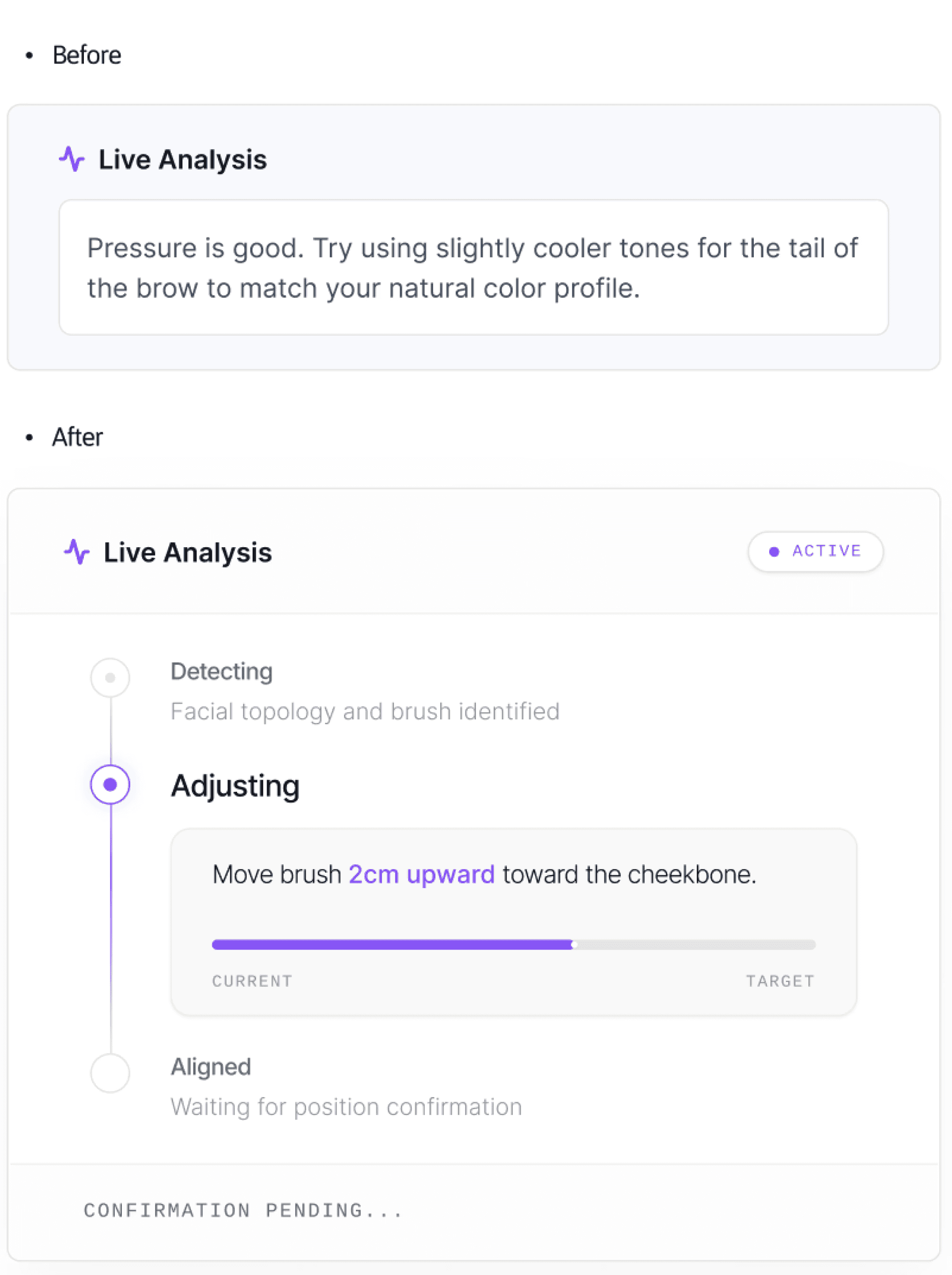
Explicit System State
Explicit System State
Making the AI's cognitive process perceivable.
Before
Live Analysis displayed a single advisory message.
Users had to interpret the camera preview to understand progress.
After
Feedback is structured into clear system states — Detecting, Adjusting, Aligned — replacing ambiguity with visible updates.
WCAG Alignment
• 4.1.3 Status Messages
• 1.3.1 Info & Relationships
Users no longer need to guess whether the system understands them.
Intervention
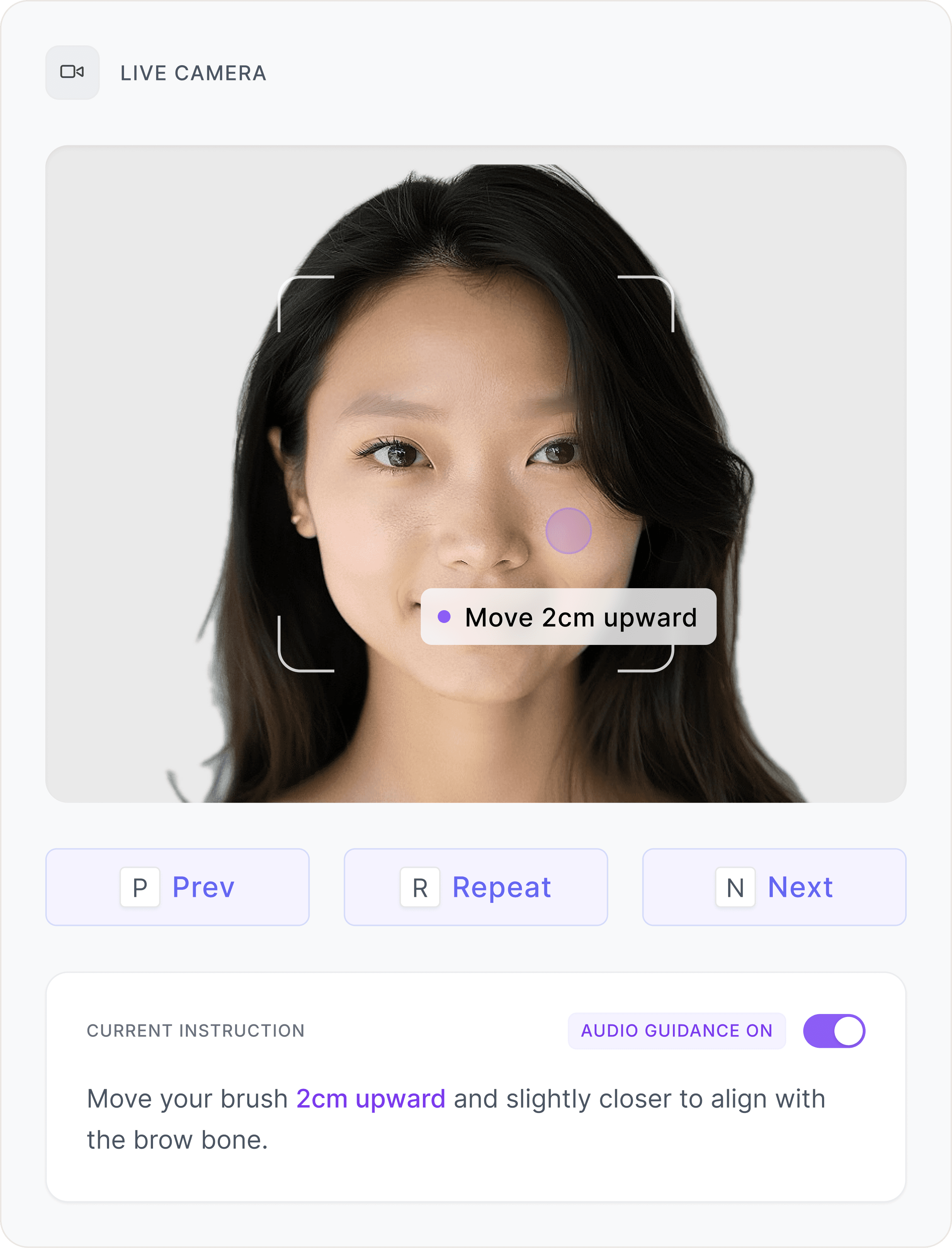
Guided Spatial Interaction
Guided Spatial Interaction
Instead of relying on visual depth perception within the camera preview, spatial positioning is translated into measurable, repeatable instructions.
Instead of relying on visual depth perception within the camera preview, spatial positioning is translated into measurable, repeatable instructions.
Directional & Distance Cues
Dynamic arrows and numeric distance indicators (e.g., "2cm
upward") replace vague visual framing, providing actionable
micro-adjustments.
Multi-Channel Feedback
Visual cues are mirrored by mandatory audio guidance and
optional haptic feedback, reducing reliance on screen
observation.
Visual cues are mirrored by mandatory audio guidance and
optional haptic feedback, reducing reliance on the screen
observation.
Keyboard Navigation
Core tutorial actions are mapped to single-key shortcuts.
This allows users — particularly screen reader users — to progress through the tutorial without scanning the interface for controls.
Conclusion
Outcome
Outcome
The redesign improves how users perceive and interact with system feedback throughout the tutorial.
The redesign improves how users perceive and interact with system feedback throughout the tutorial.
Structural accessibility fixes establish a compliant foundation, explicit system states make AI feedback understandable, and spatial guidance provides clear directional support during interaction.
Structural accessibility fixes establish a compliant foundation, explicit system states make AI feedback understandable, and spatial guidance provides clear directional support during interaction.
Together, these changes reduce reliance on visual guesswork and make the experience more predictable and accessible.
Together, these changes reduce reliance on visual guesswork and make the experience more predictable and accessible.
Accessibility Validation
Accessibility Validation
Basic accessibility checks were conducted to verify the redesigned interaction.
Basic accessibility checks were conducted to verify the redesigned interaction.
Keyboard Walkthrough
Keyboard Walkthrough
PASS
Logical tab navigation across all control surfaces
Logical tab navigation across all control surfaces
Visible, high-contrast focus states enforced globally
Visible, high-contrast focus states enforced globally
Focus containment confirmed within modal dialogs
Focus containment confirmed within modal dialogs
Screen Reader Smoke Test
Screen Reader Smoke Test
PASS
Semantic regions independently discoverable via rotor
Semantic regions independently discoverable via rotor
Real-time status updates injected via polite live regions
Real-time status updates injected via polite live regions
Blocking errors trap focus and announce immediately
Blocking errors trap focus and announce immediately
From Color‑blind friendly
to Vision‑independent guidance
Overview
Visual impairment is not a single condition
—it exists on a spectrum
Lumina is an AI-powered makeup tutorial developed for Microsoft’s Imagine Cup. The first version focused on helping users with color blindness apply makeup without relying on color cues.
After 50+ user interviews, we realized the problem was larger: visual impairment exists on a spectrum.
In our second iteration, we expanded Lumina toward a vision-independent experience — re-architecting the tutorial flow with WCAG principles so users can complete each step through structured feedback, keyboard navigation, and screen reader support.
Role
Product Designer
CONTEXT
Microsoft Imagine Cup
Users
Low-vision to Blind
Focus
Vision-independent interaction
The Problem
The product's limitations weren't just missing contrast ratios.
The fundamental interaction model excluded users entirely.
Level 1: Compliance
Structural gaps.
Contrast & Layout: Low contrast typography and completely indistinguishable interface boundaries.
Semantics: Unlabeled icon-only controls disrupting predictable screen reader traversal.
State Architecture: Unannounced live updates causing continuous interaction context loss.
Level 2: Experience
Interaction exclusion.
Feedback Loops: Absolute reliance on the camera preview as the sole interaction feedback mechanism.
Confirmation: Zero semantic or auditory alternatives provided for AI detection confirmations.
Spatial Awareness: Assumed visual depth perception, effectively blocking completely blind users.
WCAG 1.4.3: Low Text Contrast
Text relies heavily on light grays (approx. 2.8:1) against white backgrounds, failing the 4.5:1 minimum requirement.
WCAG 1.4.11: Non-Text Contrast
Controls, borders, and progress indicators lack sufficient contrast, failing the 3:1 minimum requirement for non-text elements.
Missing Semantics & Targets
Interactive elements do not meet the 24×24 minimum hit area (WCAG 2.2). No visible focus styles are defined for keyboard users.
Dynamic feedback areas lack explicit status communication for assistive technologies.
WCAG 1.4.3 & 1.4.11: Contrast
All text elements were updated to meet the 4.5:1 minimum contrast ratio. Non-text elements—including controls, boundaries, and progress indicators—were adjusted to exceed the required 3:1 threshold.
WCAG 2.5.8: Target Size
Interactive controls were redesigned to meet minimum touch target size requirements, improving usability for mobile and motor-impaired users.
WCAG 4.1.2 & 4.1.3:Semantics
Accessibility semantics were defined to support assistive technologies.
Dynamic feedback areas and icon-only controls include appropriate labeling and structural hierarchy guidelines.
Intervention
Visual & Structural Refinements.
Resolving contrast, target sizes, and state indication for an accessible foundation.
Visual-First
Low Compliance
Current Focus
Eyebrows
2/5
Step 1
Step 2
Step 3
Outline Shape
Start by outlining your brows with light
strokes, following your natural brow
shape from the bottom edge.
Tools Needed
Eyebrow pencil or powder
Spoolie brush
Angled brush (optional)
Live Analysis
Pressure is good. Try using slightly
cooler tones for the tail of the brow to match your natural color profile.
Inclusive-First
AA / AAA Compliant
Current Focus
Eyebrows
Step 2 of 5
Step 1
Step 2
3
Step 3
Outline Shape
Start by outlining your brows with light
strokes, following your natural brow shape
from the bottom edge.
Watch Tutorial
Tools Needed
Eyebrow pencil or powder
Spoolie brush
Angled brush (optional)
Live Analysis
Pressure is good. Try using slightly
cooler tones for the tail of the brow to match your natural color profile.
Intervention
Explicit System State
Making the AI's cognitive process perceivable.
Before
Live Analysis displayed a single advisory message.
Users had to interpret the camera preview to understand progress.
After
Feedback is structured into clear system states — Detecting, Adjusting, Aligned — replacing ambiguity with visible updates.
WCAG Alignment
• 4.1.3 Status Messages
• 1.3.1 Info & Relationships
Users no longer need to guess whether the system understands them.
Intervention
Guided Spatial Interaction
Instead of relying on visual depth perception within the camera preview, spatial positioning is translated into measurable, repeatable instructions.
Directional & Distance Cues
Dynamic arrows and numeric distance indicators (e.g., "2cm upward") replace vague visual framing, providing actionable micro-adjustments.
Multi-Channel Feedback
Visual cues are mirrored by mandatory audio guidance and optional haptic feedback, reducing reliance on screen observation.
Keyboard Navigation
Core tutorial actions are mapped to single-key shortcuts. This allows users — particularly screen reader users — to progress through the tutorial without scanning the interface for controls.
Conclusion
Outcome
The redesign improves how users perceive and interact with system feedback throughout the tutorial.
Structural accessibility fixes establish a compliant foundation, explicit system states make AI feedback understandable, and spatial guidance provides clear directional support during interaction.
Together, these changes reduce reliance on visual guesswork and make the experience more predictable and accessible.
Accessibility Validation
Basic accessibility checks were conducted to verify the redesigned interaction.
Keyboard Walkthrough
PASS
Logical tab navigation across all control surfaces
Visible, high-contrast focus states enforced globally
Focus containment confirmed within modal dialogs
Screen Reader Smoke Test
PASS
Semantic regions independently discoverable via rotor
Real-time status updates injected via polite live regions
Blocking errors trap focus and announce immediately